What does an AI cold email agent do that cold email software does not?
Cold email software sends the sequence and stops at the reply. An AI cold email agent sends the sequence, and then reads the reply over IMAP and answers it, from the same address, from your Q&A pairs, documents and data points, and offers real open slots from your calendar and books the one the person picks. It also carries the rest of the follow-up: when an email is not opened, the same campaign sends a text on your own number and then places a call, so the people who never open mail are reached on a channel they do read. One agent, one knowledge base, one history per person.
How many mailboxes can I connect, and what does each one cost?
As many as you like, and nothing each. An agent holds every mailbox you connect to it, on any domain, and campaigns rotate across them inside an hourly cap per mailbox. Gmail and Outlook connect with an app password; any other provider is entered as an SMTP and IMAP host. There is no per-mailbox fee and no per-contact tier: the plan is $25 a month or $200 a year for the whole account, with unlimited agents, mailboxes, contacts and lists. Adding a sixth address to spread the load costs the same as the first.
How does the email warm-up work?
Mailboxes that opt in send each other ordinary mail on a ramp, starting at five a day and rising. The receiving mailbox finds each message, moves it out of spam if it landed there, marks it read and replies to a share of them, which is the pattern of a real correspondent. Each mailbox shows its warm-up day on the agent's Email tab, next to its health score and inbox placement, so you can see where a new address is on the ramp before you put a campaign on it. Warm-up is included; there is no separate service or fee.
What is in the health score, and what happens when a mailbox fails?
Every mailbox carries a score out of 100, built from three things: SPF, DKIM and DMARC on the sending domain; seven days of real sends and bounces through that address; and where its own warm-up mail is landing in the network. The reasons are listed under the score, so a low number tells you which record is missing or which measure has slipped. When a mailbox's bounce rate or spam placement passes a threshold, it is pulled out of campaign rotation automatically, before it damages the domain, and the campaign carries on through the other addresses on the agent. Put it back when the score recovers.
Does the AI cold email agent really answer replies itself?
Yes, on the mailboxes you switch auto-reply on for. A reply comes back over IMAP and the agent answers it from the address it arrived at, from the material you gave it: documents, Q&A pairs, prices and hours, and the pages of your site it may link to. It replies once per thread, respects a daily cap per sender, and ignores bounces, out-of-office replies and no-reply addresses. Every answer is stored alongside the material it was generated from. Reply in a thread yourself and the agent stands down on that conversation until you hand it back, and the replies you named in its instructions come to you instead.
What happens to the people who never open the email?
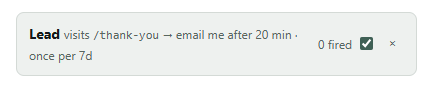
They get a different channel. Each step in a campaign has a send condition, opened, not opened, clicked or not clicked, and opens are recorded per campaign against each person. So the second email goes to the people who opened the first, and a text goes out on day 2, on your own number through Twilio or one of eight other carriers, to the people who did not. A call on day 5, on your own Twilio number, goes to whoever is still silent. All of it is one campaign on one agent, and a reply, a booking or an opt-out on any channel ends it on all of them.
How are unsubscribes handled, and is it compliant?
Every campaign email carries a one-click unsubscribe. Anyone who uses it is added to a suppression list, skipped by every future send, and any message already queued to them is cancelled, and an opt-out on one channel stops the sequence on every channel. The agent also stays inside a daily cap per sender and hourly caps per mailbox, and replies once per thread. Whether a given list may be emailed at all, under CAN-SPAM, GDPR, PECR or whatever applies where you and your recipients are, is your decision and your responsibility, as it would be with any tool. What you get here is the controls, and a record of every send and reply.
Does sending through my own server put my domain at risk?
It puts the reputation where it belongs, on your domain, rather than on a shared relay where other people's traffic can spend it. The risk of cold email is volume from an unwarmed address with missing records, and that is what the warm-up ramp, the health score and the automatic rest are for. Many people run cold mailboxes on a separate domain from their main one, and the agent does not mind which: connect as many addresses on as many domains as you like, and the score for each is on the screen before you press Start. A mailbox that slips leaves rotation on its own, so one bad morning does not become a bad month.